AI-assisted software development starts to pay off when it moves from prompts to process. In our own projects, a large and complex task that used to take 1-2 weeks moved in up to 1 day once the architecture was clear and an agent worked inside it. Typical bugs turned into an autonomous cycle, where the developer reviews the result instead of staying engaged through every small fix.
The setup matters more than the model. On AdminTool, an existing Blazor Server and .NET product, the team layered project rules, 11 commands, 12 skills, and 3 subagents, and required an E2E scenario that reproduces each bug before any fix. On Telepathy, a greenfield .NET 10 and React product, agents wrote the code while people shaped the input, reviewed, and corrected course. In both cases, a human still decides what ships.
Below, we cover what we tested in our workflow, three examples (test-first bug fixing, Figma-to-code for the UIKit, and structured subagents with reusable commands), what changed for delivery speed and team focus, where human review stays non-negotiable, and what this means for client work.
The Real Question Is Not Whether AI Can Write Code
Most teams have already seen that AI can generate code. Sometimes it is useful. Sometimes it solves the nearest visible problem and misses the larger design. Sometimes it needs more context than the ticket gives it.
So the question we also care about is different:
Can AI work inside a team’s engineering standards without turning the codebase into a pile of one-off decisions?
That question changes the whole setup. The model needs context before it touches code. It needs commands that run the project the same way a developer does. It needs a testing loop that proves a bug before and after a fix. It needs review, because even good generated code can be wrong in a product-specific way.
In other words, AI-assisted development is process design.
When the process is weak, the model becomes another source of noise. When the process is explicit, the model can take over a surprising amount of routine work.
Prime Chat AI Mobile Assistant by Shakuro
What We Tested in Our Workflow
The first serious test happened in an existing AdminTool project built with Blazor Server, .NET, CSS, a bit of JavaScript, and MongoDB.
That context matters. This was not a clean demo project with no history. It already had architecture, UI patterns, project rules, and delivery routines. AI had to work with the product as it existed.
The setup for software development automation grew in layers:
- `CLAUDE.md` defined the basic working rules: delegate atomic work to subagents, keep the main context focused on planning, delegation, and synthesis.
- Project commands handled repeatable actions such as rebuilds, start/stop scripts, Jira routines, Figma inspection, deployment, and release preparation.
- Skills captured recurring workflows: task triage, clarification, browser verification, E2E scenario writing, E2E linting, and review before commit.
- Subagents took narrow roles, including quick .NET fixes, Telerik Gantt work, and Blazor code review.
That layered setup matters. The more deterministic parts of the workflow stayed deterministic: PowerShell scripts, build commands, browser sessions, and release routines. The model orchestrated around them instead of improvising every step.
In total, AdminTool had 11 commands, 12 skills, and 3 subagents. But the important part is not the count. The important part is the layering: rules, deterministic commands, workflow skills, and role-based subagents.
Another project, Telepathy, tested a different level of autonomy. It was a greenfield product with a .NET 10 API, clean architecture, PostgreSQL, Identity and JWT, FastEndpoints, and a Vite, React, and MUI web client. In that project, code authoring was handled by agents, while the human role shifted toward detailed input, review, manual checks, and correction of important decisions.
The difference between the two projects is huge. AdminTool uses artificial intelligence as an implementer inside a human-defined architecture. Telepathy uses AI as a more autonomous feature-building pipeline, where the human role shifted toward detailed input, review, and course correction.
Still, neither case removes the need for human responsibility.
Three workflows show what this looked like in practice.
Example 1: Test-First Bug Fixing With an E2E Scenario
The most stable workflow in AdminTool was bug fixing.
The AI-assisted software development workflow works like this: a project manager creates a bug in Jira. The agent reads the ticket, checks whether it has enough information, and asks clarifying questions if needed. Before changing the code, it has to create an E2E scenario that reproduces the bug locally. It forces the agent to prove the problem existed before proposing a fix.
Only after the bug was reproduced did the agent move to implementation. Once the fix is ready, it runs the same scenario again. The expected result changes from “bug confirmed” to “bug fixed.” Then the code goes through review.
The full cycle looks like this:
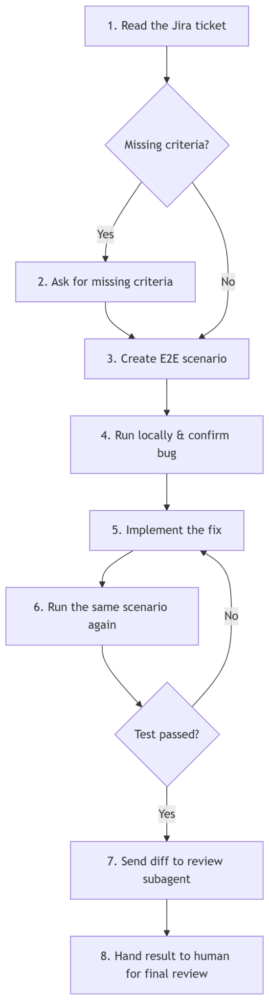
This sounds simple, but it changes the quality of AI work. Without the test-first step, the model can fix the symptom it sees in the ticket. With the E2E scenario, it has to interact with the product and prove behavior.
The E2E workflow itself also evolved. The team did not start by building a heavy Playwright setup. Instead, the first version used Chrome DevTools MCP with structured Markdown scenarios. Over time, the process became more reliable: scenarios followed templates, checks became more consistent, and the model stopped copying large DOM snapshots into context. Instead, helper JavaScript functions identified controls and triggered the right events.
That reduced context load and made the loop faster.
There was still a real limit in AI-assisted software development. Development work could be parallelized through subagents, but browser verification used one Chrome DevTools session. So testing remained more sequential than the coding work around it. That is one reason Playwright and parallel browser sessions are a natural next step.
Example 2: Figma-to-Code and the UIKit/Component Workflow
Another important workflow connected Figma directly to implementation.
For AdminTool, a set of commands and plugin-like routines made it possible to select a control in local Figma, inspect it through MCP, and ask the agent to move it into code. In many cases, the agent could either generate the Blazor control directly or describe the selected design accurately enough to guide the implementation.

Figma-to-code workflow
This was not a one-shot trick. The process went through many iterations until it became predictable.
The practical result was big: the UIKit was written automatically with Claude Code and Figma MCP. More importantly, it was written in a consistent way.
That consistency affected the rest of the workflow. When UI components followed the same patterns, many later bugs became simpler. They were less likely to be deep architectural failures and more likely to be functional issues in a known structure. That made the autonomous bug-fix loop more useful.
This is one of the more interesting lessons from the experiment: automation in one part of delivery can make another part easier to automate.
Figma-to-code created a more uniform UIKit. A more uniform UIKit created simpler bugs. Simpler bugs fit the E2E-first autonomous fix cycle. The workflow improved because the pieces supported each other.
Example 3: Structured Subagents and Reusable Commands
Subagents solved two ordinary engineering problems: context overload and focus.
The main agent kept the larger thread of the task: what needs to happen, what should be delegated, what came back from each attempt, and what still needs review. Subagents handled smaller units of work.
In AdminTool, the roles were designed together with Claude Code around two criteria: token efficiency and domain focus. A quick fixer could handle small .NET or CSS issues. A Telerik Gantt specialist could stay focused on a complex component. A Blazor reviewer could check the diff against project standards and clean architecture expectations.
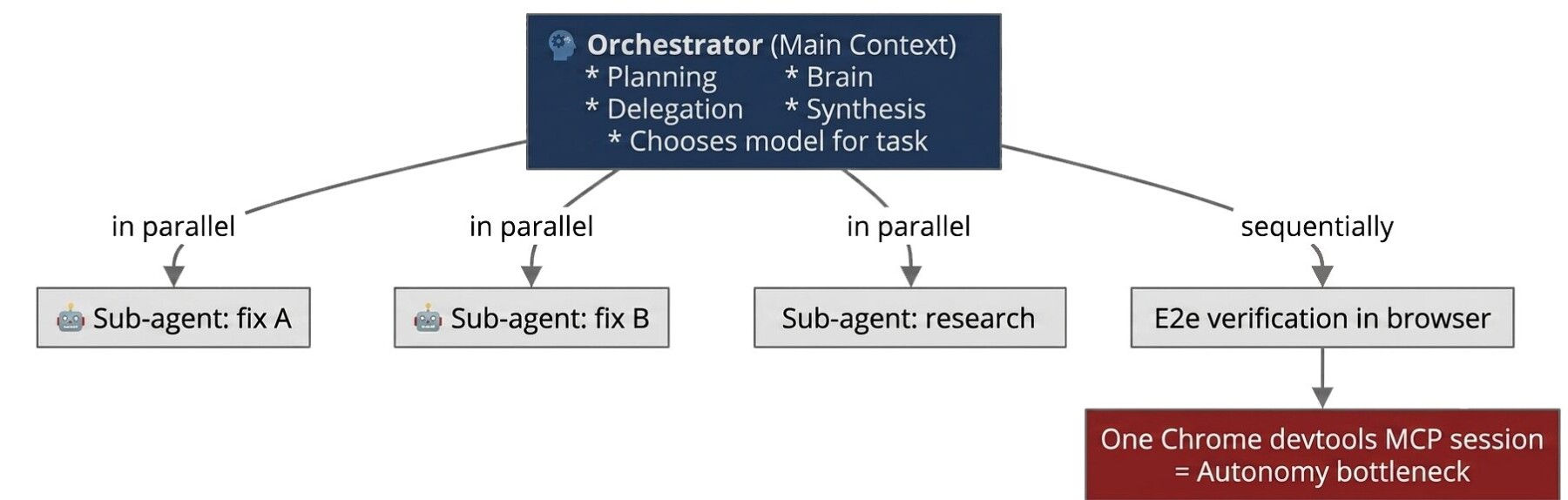
Structured subagents and reusable commands
This made the main context last longer. It also made the work easier to reason about, because each subagent had a job instead of carrying the whole project in its head.
Commands played a similar role for process work. They turned repeatable tasks into reusable workflows.
One good example is the release command. Release notes are not hard in theory, but they can take a noticeable part of a manager’s time. The command automated the routine: find the relevant commits, identify task and bug codes, group changes into the right sections, prepare release notes, and create the release branch.
That matters because AI in software development should not stop at writing code. Product delivery includes all the surrounding work: tickets, builds, release notes, deployment steps, and checks. Automating those parts removes friction from the whole team, not only from developers.
What Changed for Delivery Speed and Team Focus
The clearest speedup appeared in large tasks after the architecture was clear.
Before this workflow, a large and complex task could take one or two weeks. With an agent working inside the established architecture, first with Sonnet and later with Opus, similar work could move in a day.
That does not mean every large task should be handed to an agent from a cold start. In fact, the opposite lesson showed up early. On very large architectural tasks, the model sometimes tried to solve the immediate problem instead of building a flexible structure for future cases.
The compensation was deliberate: the human developer handled or shaped the architecture first. Once the architecture was clear, the agent became much better at extending it.
For bugs, the effect was different. The main gain was not only raw time saved. It was saved involvement.
When the process of automation in software development is matured, the developer no longer has to stay deeply engaged through every small fix. The agent can pick up the Jira issue, create the E2E reproduction, implement the fix, run the check again, and prepare the result for review. The human can work on something else and return when judgment is needed.
That is a better way to think about the value: AI gives senior developers more uninterrupted focus. It takes repeatable work off their desk without removing their responsibility for the outcome.
| Type | Before | After |
| Complex tasks | 1-2 weeks | Up to 1 day |
| Typical bug | Developer is fully engaged | Autonomous cycle, developer is a reviewer |
| Release notes + release branch | A huge chunk of the manager’s time | The /release command is fully autonomous |
| UIKit | Manually | Fully generated with Figma MCP |
| Greenfield project feature | — | Hours of autonomous work |
| Infrastructure | — | Developer’s machine + standard Claude Code subscription, no expensive API-calls |
Where Human Review Stays Non-Negotiable
The workflow becomes more autonomous over time, but the final review stays human.
In AdminTool, code first goes through the `blazor-code-reviewer` subagent. That is a useful first filter. After that, the developer still reviews the diff personally and asks for changes when needed.
That boundary in agentic software development is a matter of responsibility.
Only a human can decide whether the code should move further through the development pipeline. A model can inspect a diff, catch patterns, run tests, and compare work against written rules. It cannot own the product decision. It cannot understand every business tradeoff. It cannot be accountable to the client.
The Telepathy project made this boundary even clearer. In Telepathy, code authoring was handled by agents, including the React/MUI frontend. E2E checks helped a lot, but they did not replace human judgment. Much of the frontend checking still happens manually, and the next planned improvement is more standardization for specialized frontend agents.
So the rule is simple: use AI to widen the testing and implementation loop, but keep humans in charge of what ships.
What This Means for Client Work
The useful part is not “we use AI.” Many teams use AI now.
The useful part is that AI-assisted software development can be shaped into a fast but controlled delivery process. That is what makes it safe enough to matter.
For a client, this can mean faster movement on product work that usually gets stuck in queues: UI implementation, routine bugs, release preparation, repeated checks, and well-scoped feature work. It can also mean less context switching for senior engineers, which is often where product teams quietly lose time.
But it only works when the team sets the rules first.
A good AI-assisted workflow needs clear project documentation, repeatable commands, a testing strategy, design-system discipline, and review gates. It needs people who know when to let the agent run and when to stop it. It needs enough humility to treat the model as a capable worker inside a process, not as the process itself. Those review gates matter whether checks are run in-house or by an external QA testing company.
That is where the client benefit is strongest. AI can help a team move faster, but the quality still comes from engineering discipline: architecture, tests, reviews, and careful product judgment.
Again, the goal is not to remove developers from development. It is to move their attention to the places where human thinking has the highest value: defining the right problem, shaping the architecture, checking the tradeoffs, and deciding what is ready to ship.
Want to see where AI-assisted development could safely speed up your product workflow? Tell us about your project, and we’ll help you find the parts worth automating first.
FAQ
How much faster is AI-assisted software development?
In our AdminTool project, AI-assisted software development cut large, complex tasks from 1-2 weeks to up to 1 day, but only after a developer had shaped the architecture. On very large architectural tasks started cold, the model tended to solve the immediate problem instead of building a flexible structure. For bugs, the main gain was the developer’s saved involvement.
Can AI-assisted development replace developers?
No. AI-assisted development moves developers’ attention to defining the right problem, shaping the architecture, checking tradeoffs, and deciding what is ready to ship. A model can inspect a diff, run tests, and compare work against written rules, but it cannot own product decisions or be accountable to the client, so the final review stays human.
What does a team need before using AI agents on an existing product?
Before using AI agents on an existing product, a team needs clear project documentation and working rules, repeatable commands for builds, deployment, and releases, a testing strategy, design-system discipline, and review gates. It also needs people who know when to let the agent run and when to stop it. Without that, the model becomes another source of noise.
How do AI agents fix bugs without breaking the product?
AI agents fix bugs safely through a test-first loop. The agent reads the Jira ticket, asks clarifying questions, and writes an E2E scenario that reproduces the bug before changing code. After the fix, it runs the same scenario again until the result changes from “bug confirmed” to “bug fixed,” and the code then goes through a reviewer subagent and a developer.
Which product work benefits most from AI-assisted development?
AI-assisted development helps most with product work that usually gets stuck in queues: UI implementation, routine bugs, release preparation, repeated checks, and well-scoped feature work. Figma-to-code produced a consistent UIKit, which made later bugs simpler to fix automatically. It also means less context switching for senior engineers, where product teams quietly lose time.
Related reading
- AI Automation Software Development: What to Build, What to Automate, and Where to Start
- AI Chatbot Development: A Practical Guide for Building Business-Ready Chatbots
- NLP Application Development: Process, Use Cases, Cost, and Key Challenges
- Breaking Barriers: How AI Makes App Development Accessible for Startups